Building Accessible Virtual Spaces for Everyone in Alife Virtual
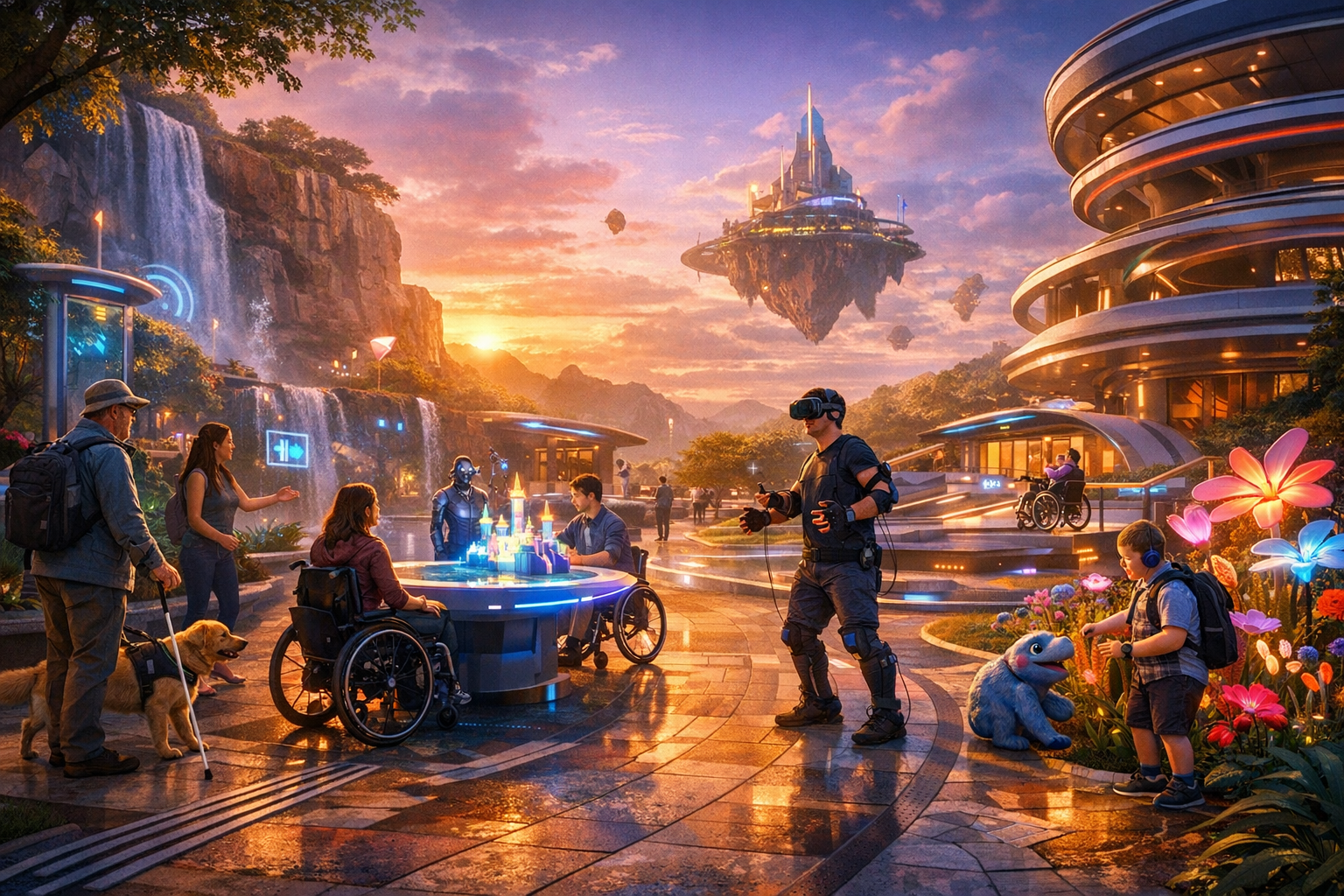
Building Accessible Virtual Spaces for Everyone — experience it now in Alife Virtual
Imagine stepping into a virtual world where every path feels welcoming, every doorway feels possible, and every social moment feels open to more people instead of closed off by design. That is the promise of accessibility in the metaverse, and it is one of the most exciting creative frontiers inside Alife Virtual. If you are dreaming about building a club, gallery, classroom, wellness garden, roleplay city, or community island that truly invites everyone in, this is where your vision can come alive.
In Alife Virtual, accessibility is not just a technical checkbox. It is a world-building philosophy. It means designing spaces that support people with visual, motor, and cognitive disabilities so they can explore, create, socialise, learn, trade, and belong. And because Alife Virtual gives creators powerful tools without crushing costs, inclusive design becomes realistic for everyday builders, not just giant teams with giant budgets.
With a FREE private island for one month, a full 65,536 sqm region, 10,000 prims for building, full LSL scripting support, and compatibility with the Firestorm Viewer, Alife Virtual makes it possible to shape meaningful, accessible environments from day one. Better still, it works on any desktop with no VR headset required, lowering the barrier to entry for users who may find VR hardware uncomfortable, unaffordable, or physically difficult to use.
If you have ever wanted to build a virtual place where more people can comfortably participate, this is your moment. Let’s explore what accessible virtual design looks like, how it feels inside Alife Virtual, and how you can start building it today.
The Experience: What an Accessible Virtual Space Feels Like
Picture arriving on a beautifully designed island in Alife Virtual. The landing point is calm, uncluttered, and easy to understand. Instead of spawning into visual chaos, you enter a welcome zone with clear signs, readable contrast, generous space for movement, and simple pathways that naturally guide you forward. There are notecards and visual cues, but also intuitive layout logic, so users do not have to decode a maze just to begin.
The environment is vivid but not overwhelming. Pathways are wide enough for easy navigation. Teleport boards are placed at logical intervals. Stairs are paired with ramps or alternate movement options. Important destinations are marked with large, legible signs and color combinations that improve visibility. Decorative effects are beautiful, but they do not drown the user in flashing distractions.
For users with visual disabilities, accessible spaces can include high-contrast textures, uncluttered floor plans, consistent wayfinding symbols, and scripted audio cues. A builder can create touch-activated orientation stations, voice-guided tours, or labeled teleport hubs that reduce confusion and help users navigate with confidence. Even something as simple as avoiding tiny floating text and using strong environmental contrast can transform the experience.
For users with motor disabilities, the difference can be profound. A thoughtfully designed venue reduces the need for precision movement. Doors are wide. Seating is easy to access. Interactive objects are not buried in cramped corners. Important actions are available through simple menu systems rather than demanding quick physical responses. Event spaces can be designed so users do not need to constantly reposition avatars to participate.
For users with cognitive disabilities, accessible design often means clarity, predictability, and reduced overload. Spaces feel easier to understand when zones are distinct, signage is consistent, interactions are simplified, and the build avoids unnecessarily complex navigation patterns. A quiet social lounge, a structured classroom, or a guided art trail can feel deeply welcoming when the environment communicates its purpose clearly.
And then there is the social side, which is where Alife Virtual truly shines. Accessible worlds are not sterile. They are alive. You can hear music in a club where dance areas are easy to reach and menus are easy to use. You can attend a class in a cleanly organised learning space. You can explore a marketplace where stalls are laid out logically and not jammed together. You can join community discussions in a peaceful amphitheater with clear entry points and seating options.
Accessibility does not make virtual worlds less magical. It makes the magic reachable.
How Alife Virtual Makes Inclusive World Building Possible
Many creators want to build more accessible spaces, but the usual problem is cost, complexity, or lack of support. Alife Virtual removes much of that friction.
1. A Free Region Gives You Room to Design Thoughtfully
Alife Virtual offers a FREE private island for one month, giving you a full 65,536 sqm region to experiment, prototype, host events, and refine your layout. That matters because accessible design often requires more space, not less. Wide walkways, clear zoning, rest areas, low-clutter layouts, and multiple navigation options all benefit from generous land.
In many competing worlds, creators cut accessibility simply because region cost is too high. Here, you can actually test what works.
2. 10,000 Prims for Practical, Human-Centered Builds
With 10,000 prims for building, you have enough creative freedom to add wayfinding systems, signage, accessible furniture arrangements, scripted help stations, orientation hubs, and low-lag decorative design without feeling instantly constrained. Inclusive environments are often built on thoughtful detail, and Alife gives you the object budget to make those details count.
3. Firestorm Viewer Familiarity Lowers the Learning Curve
Because Alife Virtual uses the Firestorm Viewer, the same viewer widely known from Second Life, many builders already understand the workflow. If you have built in Second Life before, your knowledge transfers naturally. If you are new, the ecosystem of tutorials and community knowledge around Firestorm makes learning easier. Familiar tools mean more creators can focus on inclusive design instead of fighting unfamiliar interfaces.
4. Full LSL Scripting Support Enables Accessibility Solutions
Full LSL scripting support opens the door to smarter accessibility features. Builders can create:
- Touch-to-teleport systems for simplified movement
- Orientation kiosks with landmark delivery
- Audio guidance points and narrated tours
- Menu-driven interactions instead of precise click targeting
- Low-stress event tools with clear participation prompts
- Custom doors, elevators, and transport aids
Accessibility is often about reducing friction. Scripting lets you actively remove barriers instead of only decorating around them.
5. Free Daily Classes Help Builders Learn Faster
Alife Virtual offers free daily classes in building, scripting, fashion, and business. That is a major advantage for creators who care about inclusive design but do not yet know how to implement it. You can sharpen your technical skills, ask questions, and learn how to translate empathy into actual world-building choices.
An accessible world does not have to begin with expertise. It can begin with curiosity and support.
6. Ready-Made Sims for Faster Deployment
Need to launch quickly? Pre-made furnished sims from $20/mo mean you can start with a ready-to-use environment and customise it for accessibility rather than building every wall and pathway from scratch. This is ideal for educators, community organisers, support groups, art curators, and entrepreneurs who want to create more inclusive experiences on a realistic budget.
7. A Large Member Base Creates Real Community Impact
With 1,148,000+ members, Alife Virtual offers the scale needed for inclusive spaces to matter. Accessibility is not theoretical when there is a real population ready to visit, collaborate, attend, shop, teach, and socialise. Builders are not creating empty showcases. They are shaping real lived digital experiences.
8. No VR Headset Required
Alife Virtual works on any desktop and requires no VR headset. That is huge for accessibility. Many users cannot comfortably wear VR headsets for physical, neurological, sensory, or financial reasons. Desktop access makes participation easier for a broader range of people and keeps virtual world design grounded in practical inclusion.
Why Alife Virtual Is Better for This Than Second Life, IMVU, or VRChat
| Platform | Accessibility-Friendly Advantages | Limitations Compared to Alife Virtual |
|---|---|---|
| Alife Virtual | Free private island for one month, 65,536 sqm, 10,000 prims, Firestorm compatibility, full LSL scripting, desktop access, free classes, low-cost pre-made sims | Growing visibility compared to older legacy brands, but tremendous value for builders |
| Second Life | Mature building ecosystem and similar viewer familiarity | Charges $300/month for the same region size, making experimentation and inclusive layout design far more expensive |
| IMVU | Social and avatar-focused for casual users | Less robust for open-region world building, custom land-scale accessibility planning, and deep scripted environment design |
| VRChat | Immersive social presence and strong community scenes | Heavier hardware expectations, VR-centric culture, and accessibility challenges for users who cannot or do not want to use VR equipment |
The biggest difference is cost versus creative freedom. If you want to test an accessible campus, support center, low-sensory club, or inclusive shopping district in Second Life, you are staring at a monthly price point many creators simply cannot justify. Second Life charges $300/month for the same region size that Alife offers free for one month. That changes everything.
Alife Virtual gives builders room to think generously. Instead of shrinking layouts to save money, you can create wider spaces, quieter zones, clearer navigation routes, and more user support features. That is not just a budget advantage. It is an accessibility advantage.
Step-by-Step: How to Build an Accessible Virtual Space in Alife Virtual
-
Visit the official website and create your account.
Start at https://www.alifevirtual.com. Register your account and explore the platform options available to new members.
-
Claim your free avatar and get comfortable.
Alife Virtual includes a FREE full-body mesh avatar with custom outfits, so you can enter the world looking polished right away. Spend a little time learning movement, camera controls, and menus in Firestorm.
-
Request or activate your free private island.
Take advantage of the free one-month private island. This is your test lab and creative canvas. Think of it as a full-scale prototype zone where you can build accessibility into the foundation, not tack it on later.
-
Map your accessibility goals before you build.
Ask yourself who your space is for. Will you support visually impaired users with stronger contrast and audio cues? Motor-impaired users with simplified navigation? Cognitive accessibility through calmer layouts and clear signage? Decide early, because accessibility works best when planned from the start.
-
Create a simple, readable landing area.
Your landing point should be calm and obvious. Include welcome signage, orientation boards, a teleport menu, and basic instructions in plain language. Avoid visual clutter. Give users room to stop, orient themselves, and choose where to go next.
-
Design wide pathways and intuitive zones.
Use broad walkways, distinct destinations, and consistent environmental cues. Keep public areas easy to reach. If a user has to navigate around decorative obstacles or decipher a complex maze, your design is working against them.
-
Use scripts to reduce friction.
With LSL scripting, add teleport hubs, guided tours, simple interaction menus, or touch-to-receive landmarks. Scripted helpers can dramatically improve user confidence and reduce navigation stress.
-
Test visual accessibility.
Check font sizes, sign contrast, lighting, and texture noise. Important objects should stand out. Avoid tiny text and busy patterns where information matters most.
-
Test motor accessibility.
Can users reach seating, stages, vendors, and information points without delicate positioning? Can major features be activated with simple clicks instead of difficult camera angles? Make common actions easy.
-
Test cognitive accessibility.
Walk through your build as a first-time visitor. Is the purpose of each area obvious? Are instructions consistent? Is the environment stimulating in a pleasant way or overwhelming in a chaotic way? Simplify until the space feels welcoming.
-
Take free daily classes to improve the build.
Join Alife’s free classes on building and scripting to refine your environment. You may discover better methods for menus, signage, scripted transport, or event design.
-
Invite feedback from real users.
The best accessible spaces are shaped by community input. Open your island to visitors, ask what feels easy or difficult, and keep improving. Accessibility is an ongoing design practice, not a one-time badge.
Practical Accessibility Ideas World Builders Can Use Right Now
- High-contrast signs: Use readable fonts, dark/light contrast, and simple wording.
- Teleport networks: Reduce long travel distances and complicated routes.
- Quiet zones: Offer low-stimulation areas for rest and conversation.
- Consistent layout logic: Keep similar functions grouped together.
- Interactive help kiosks: Deliver landmarks, notecards, and instructions in one touch.
- Alternative routes: Pair stairs with ramps, teleports, or direct access points.
- Clear event seating: Leave generous space and visible pathways around social venues.
- Simple menus: Let users choose actions from dialog boxes instead of requiring precise object interaction.
- Reduced clutter: Decorative detail should never interfere with usability.
- Predictable navigation: Make entrances, exits, and key attractions easy to identify instantly.
Community Spotlight: Inclusive Creativity in Action
One of the most inspiring things about Alife Virtual is how builders use the platform’s freedom to create spaces with real social meaning. Across the community, creators have built education hubs, fashion venues, support-oriented gathering places, and newcomer-friendly social regions that already reflect the principles of accessibility, whether explicitly labeled that way or not.
Some builders focus on orientation-friendly environments that help new users settle in without stress. They create spacious arrival zones, visually clean welcome centers, and guided teleport systems so visitors do not feel lost in their first minutes online. That simple act of thoughtful onboarding supports both cognitive accessibility and overall retention.
Others have used scripting to create more intuitive event participation tools. Instead of requiring people to navigate crowded dance floors or tightly packed vendor aisles, they build open layouts with obvious interaction points and easy access to key experiences. The result is not only more accessible but more enjoyable for everyone.
Fashion creators in Alife also contribute to inclusion by helping residents express themselves confidently with the platform’s free full-body mesh avatar and custom outfit possibilities. Self-expression matters. Feeling represented, prepared, and socially comfortable can make a huge difference in whether someone feels truly welcome in a virtual environment.
The educational side is especially powerful. Through free daily classes, community members learn building and scripting skills that can be directly applied to accessible design. A builder who learns how to script a teleport board today may create a mobility-friendly public hub tomorrow. A designer who studies layout and communication may go on to create a low-stress classroom for learners who need structure and clarity.
The best virtual communities are not built only to impress visitors. They are built to include them.
That spirit is growing in Alife Virtual because the platform lowers the financial pressure that often forces creators to choose spectacle over usability. When land is affordable or free to start, people can build with empathy, not just urgency.
FAQ: Building Accessible Spaces in Alife Virtual
1. What makes a virtual space accessible?
An accessible virtual space reduces barriers for people with different needs. That can include clearer signage for visual accessibility, wider layouts and teleport tools for motor accessibility, and simpler, calmer navigation for cognitive accessibility. The goal is to make exploration and participation easier for more people.
2. Do I need advanced technical skills to build accessibility features in Alife Virtual?
No. You can begin with simple design choices like cleaner layouts, better contrast, and clearer wayfinding. If you want more advanced features, such as scripted guidance or teleport systems, Alife Virtual’s full LSL scripting support and free daily classes can help you learn step by step.
3. Is Alife Virtual good for builders coming from Second Life?
Yes. Alife Virtual uses the Firestorm Viewer, so the environment feels familiar to many Second Life users. The major advantage is cost: Second Life charges $300/month for the same region size, while Alife offers a free private island for one month.
4. Do users need VR equipment to enjoy accessible builds in Alife Virtual?
No. Alife Virtual works on any desktop and requires no VR headset. That makes it easier for users who cannot comfortably use VR hardware or simply prefer desktop access.
5. Can I launch quickly if I do not want to build everything from scratch?
Absolutely. Pre-made furnished sims from $20/mo let you start with a ready-to-use region and adapt it for accessibility. This is a great option for educators, event organisers, and community leaders who want to create welcoming spaces fast.
Build a Better Virtual World, Starting Now
The future of virtual life will not be defined only by realism, graphics, or trend-chasing platforms. It will be defined by who gets to participate. Accessible design is how world builders turn a beautiful region into a truly social one. It is how creators transform empty digital land into a place where more people can arrive, understand, move, connect, and stay.
Alife Virtual gives you an unusually powerful opportunity to do exactly that. You get a FREE private island for one month, a full 65,536 sqm region, 10,000 prims, full LSL scripting support, a free full-body mesh avatar, and a familiar Firestorm Viewer workflow. You can learn through free daily classes, launch faster with pre-made furnished sims from $20/mo, and build for a community of 1,148,000+ members on desktop without requiring VR gear.
If you have been waiting for the right platform to create an inclusive classroom, a sensory-considerate art space, a newcomer-friendly social hub, or a public region that genuinely welcomes people with visual, motor, and cognitive disabilities, this is your invitation.
Start building accessible virtual spaces for everyone at https://www.alifevirtual.com.
Bring your dream to life in Alife Virtual, and build the kind of world more people can finally call home.
🎁 Ready to Live This Experience?
Claim your FREE island in Alife Virtual and start today!
Claim Your Free Island Now →No credit card required · Takes 2 minutes · for one month free