Virtual World Weddings: Planning the Perfect Digital Ceremony in Alife Virtual
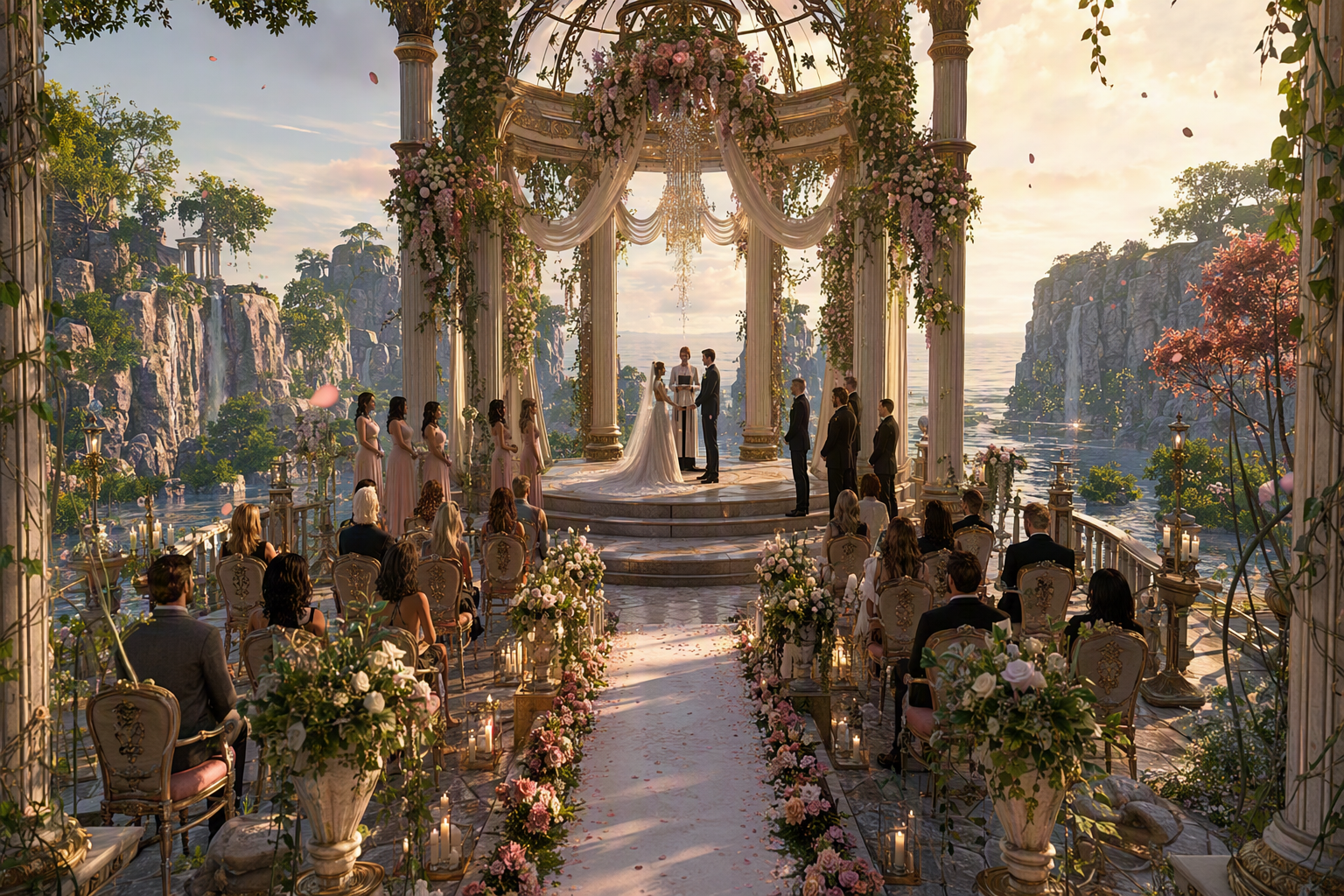
Virtual World Weddings: Planning the Perfect Digital Ceremony — experience it now in Alife Virtual
Imagine walking toward a flower-lined aisle suspended above the clouds, your partner waiting beneath a glowing arch while friends from around the world gather in formalwear, cheering in real time. The music swells, cameras flash, vows appear in beautifully scripted sequence, and your reception begins moments later on a moonlit beach with dancing, fireworks, and laughter that continues long after the ceremony ends. In Alife Virtual, this is not just possible—it is wonderfully achievable, affordable, and deeply personal.
If you have been dreaming about a wedding that feels magical, social, creative, and free from the limits of physical distance, a virtual world ceremony may be exactly what you are looking for. Whether you want an elegant cathedral celebration, a fantasy castle union, a cyberpunk rooftop vow exchange, or a tropical sunset reception, Alife Virtual gives you the space and tools to build an event that reflects your love story in vivid 3D detail.
This guide will walk you through everything you need to plan the perfect digital wedding in Alife Virtual, from venue design and invitations to ceremony scripting and unforgettable reception ideas. If you are ready to turn imagination into a living, shared experience, this is where your planning begins.
Why Virtual World Weddings Feel So Memorable
A virtual wedding is far more than a simple online event. In a fully realised 3D world, your ceremony becomes a place people can enter, explore, and emotionally connect with. Guests do not just watch—they arrive as avatars, move through the venue, interact with décor, greet one another, dance, take photos, and celebrate together.
Picture the experience inside Alife Virtual. Soft lighting reflects on polished marble floors. Petals drift through the air. A string quartet or curated playlist creates atmosphere as guests teleport in and take their seats. Your avatar appears in a custom wedding outfit, fully styled with the exact look you want, from classic tuxedo elegance to dramatic fantasy couture. When the ceremony starts, scripted lighting changes, music cues trigger at just the right moment, and every guest feels part of a coordinated, living event.
The sensory impact matters. Virtual world weddings can be grand, intimate, whimsical, theatrical, or serene. You can surround your vows with waterfalls, lanterns, stained glass, starfields, rose gardens, snowy mountain peaks, floating islands, or candlelit halls. Because the world is digital, your budget is not consumed by physical logistics. Instead, your creativity leads.
There is also a uniquely social quality to these ceremonies. Friends and family from different cities or countries can attend without travel barriers. Community members can help build, decorate, DJ, photograph, script, host, or officiate. In many cases, the planning itself becomes part of the joy, with couples collaborating on every detail of their shared space.
What Makes a Wedding in Alife Virtual So Special
Alife Virtual makes dream weddings possible because it combines accessibility, creative freedom, and a large active social world. You are not stepping into a limited wedding simulator. You are entering a full 3D virtual world where your ceremony can be as simple or as elaborate as you want.
Beautiful space to build your vision
One of the biggest advantages is the free island + 1,000 C$ for shopping (until 31 Dec 2026) (65,536 sqm) — no lock-in. That is an enormous amount of space for a wedding venue, reception area, photo garden, honeymoon hideaway, and guest gathering zone all in one place. Better still, you get 10,000 prims for building, giving you serious flexibility for décor, architecture, seating, landscaping, lighting, and custom scripted details.
Stylish avatars for the big day
Your wedding look matters. Alife Virtual includes a FREE full-body mesh avatar with custom outfits, making it easy to create a polished appearance for the ceremony. Whether your aesthetic is luxury formalwear, boho romance, dark fantasy elegance, or futuristic glam, you can style your avatar to match the exact mood of the event.
Familiar tools and powerful scripting
Alife Virtual uses Firestorm Viewer (same as Second Life), which is a major advantage for users already familiar with virtual world creation. If you have experience with object placement, land editing, camera tools, inventory management, or building workflows, the transition feels natural. If you are new, the learning curve is softened by free daily classes covering building, scripting, fashion, and business.
And if you want your ceremony to feel polished and dynamic, Alife Virtual offers full LSL scripting support. That means you can script aisle walks, music triggers, timed vows, animations, bouquet tosses, fireworks, dance systems, RSVP kiosks, guest books, teleport signs, and more.
Accessible for guests
Virtual weddings should be easy to attend, and Alife makes that simple. It works on any desktop — no VR headset required. Guests do not need expensive hardware to be part of your big moment, which opens the event to a much wider circle of loved ones.
A large world and active community
With 1,148,000+ members, Alife Virtual offers the community scale that helps events feel lively and supported. That means access to builders, decorators, fashion creators, DJs, hosts, and social groups who understand how to create memorable celebrations.
If you want a faster start, there are also pre-made furnished sims from $20/mo — ready to use immediately. For couples who want a beautiful venue without building from scratch, this is an excellent shortcut.
The Alife Virtual Wedding Experience: What It Can Look Like
Every couple imagines something different, and that is exactly why digital weddings are so exciting. In Alife Virtual, your ceremony can be tailored with cinematic control and deeply personal flair.
- Romantic garden wedding: Ivy-covered arches, rose paths, white seating, birdsong ambience, and soft sunset skies.
- Beach ceremony: Gentle waves, glowing lanterns, barefoot formalwear, tiki reception bar, and night-time fireworks.
- Castle celebration: Grand halls, banners, candlelight, medieval music, long banquet tables, and dramatic balcony photos.
- Fantasy sky venue: Floating platforms, shimmering stars, magical particle effects, luminous trees, and ethereal vows above the clouds.
- Modern luxury wedding: Sleek architecture, rooftop skyline views, custom spotlights, champagne lounge, and chic dance floor.
The ceremony itself can be highly immersive. Guests arrive via teleporters or landing point signs. A greeter welcomes them and shares notecards with seating guidance and dress code. Music begins as people take their seats. Your officiant stands in place, readings can be typed or voice-delivered, and scripted moments keep everything flowing smoothly.
After the vows, the reception begins seamlessly. The same island can host cocktail hour, formal photography, a first dance area, party games, and after-hours socialising. Because the venue is virtual, transitions are effortless. Your guests can move from chapel to ballroom to beach lounge in seconds.
Why Alife Virtual Is Better for Weddings Than Second Life, IMVU, or VRChat
| Platform | Wedding Strengths | Why Alife Stands Out |
|---|---|---|
| Alife Virtual | A free island + 1,000 C$ for shopping (until 31 Dec 2026), 10,000 prims, full avatar customisation, LSL scripting, desktop access, large community | Outstanding value, strong creative control, easy guest access, and familiar Firestorm workflow |
| Second Life | Established creator ecosystem and similar viewer experience | Second Life charges $199/mo for same region size — Alife is FREE, making Alife dramatically more accessible for couples planning a wedding |
| IMVU | Avatar social features and themed chat spaces | Less world-building freedom compared to Alife’s island ownership, prim allowance, and scripted venue design flexibility |
| VRChat | Immersive social gatherings and expressive avatars | Often more dependent on performance-heavy setups and social navigation; Alife works on any desktop — no VR headset required, making attendance easier for a wider guest list |
For weddings specifically, Alife Virtual occupies a rare sweet spot. It gives you substantial land, familiar tools, strong customisation, and event-ready social systems without asking you to commit to the steep monthly region costs that can make other platforms feel impractical.
If your goal is to create a beautiful, personalised ceremony while keeping setup costs sensible, Alife is the clear winner.
Step-by-Step: How to Plan Your Perfect Wedding in Alife Virtual
1. Join Alife Virtual and claim your space
Start by visiting https://www.alifevirtual.com and creating your account. Once inside, take advantage of the free island + 1,000 C$ for shopping (until 31 Dec 2026) (65,536 sqm) — no lock-in. This gives you the perfect blank canvas to create your ceremony and reception in one elegant destination.
2. Set up your avatar look
Your wedding begins with presence. Use the FREE full-body mesh avatar with custom outfits to style your ceremony appearance. Choose coordinated looks for the couple, and consider optional dress code suggestions for guests such as formal, fantasy, beach chic, or black tie.
3. Install and learn the viewer
Because Alife uses Firestorm Viewer (same as Second Life), many users will find building and navigation intuitive. If you are brand new, attend the platform’s free daily classes on building, scripting, fashion, and business. Even one or two sessions can dramatically improve your confidence with editing objects, adjusting terrain, or managing event flow.
4. Choose your wedding theme
Decide on the emotional tone and visual setting before you build. Ask yourselves:
- Do you want elegant, whimsical, fantasy, modern, or playful?
- Will the ceremony be intimate or grand?
- Will the reception happen in the same area or a second zone on the island?
- What colours, flowers, lighting, and music define your love story?
Creating a mood board or simple checklist helps keep every design choice cohesive.
5. Build or choose a venue
With 10,000 prims for building, you can create a custom venue from the ground up. Build a chapel, gazebo, beachfront pergola, palace terrace, or floating platform. Add seating, arches, floral arrangements, pathways, signage, dance floors, bars, and photo backdrops.
If you prefer speed, choose one of the pre-made furnished sims from $20/mo — ready to use immediately. This is ideal if you want to focus more on styling and guest experience than on full construction.
6. Script the ceremony flow
This is where your event becomes truly polished. Thanks to full LSL scripting support, you can automate or enhance important wedding moments.
- Guest arrival greeter with welcome note
- Teleport boards to ceremony and reception zones
- Timed music and sound cues
- Animated aisle walk systems
- Pose stands for the couple and officiant
- Sequential vow text displays
- Ring exchange animations
- Applause and celebration particles
- Bouquet toss game
- Fireworks finale
If you are not confident with scripting yet, the free classes and community are invaluable. Many creators and residents are happy to help with setup ideas and practical advice.
7. Create invitations and guest information
A great virtual wedding begins before the day itself. Send digital invitations with:
- Date and time, including time zone
- Direct location or teleport instructions
- Dress code
- Viewer download reminder if needed
- Optional RSVP instructions
- Brief event schedule
You can also create a welcome notecard for first-time guests, especially if some attendees are new to virtual worlds. Include simple instructions on movement, camera controls, and where to sit.
8. Rehearse everything
Do a complete run-through before the event. Test teleport points, seating, scripts, music, lighting, avatar positions, and transitions between ceremony and reception. Ask a few friends to attend the rehearsal so they can spot issues you may miss.
9. Design a reception guests will remember
The best virtual receptions feel alive. Consider adding:
- A first dance area with spotlight effects
- Live DJ or curated playlist
- Photo booth with themed props
- Guest book wall or message station
- Mini games or treasure hunt for fun keepsakes
- Fireworks, lantern release, or particle heart effects
- Private lounge spaces for small-group conversation
- Cake-cutting animation and toast sequence
Because your island is large, you can create multiple zones so guests naturally flow through the celebration instead of standing in a single area.
10. Capture the memories
Assign a photographer or ask friends to take snapshots from different angles. Virtual weddings create extraordinary images, especially with custom lighting, scenic backdrops, and coordinated formalwear. Your event can live on through albums, social media sharing, and anniversary revisits to the same venue.
Wedding Design Tips to Make Your Ceremony Feel Premium
- Use lighting intentionally. Soft glow, candles, fairy lights, and sunset sky settings create instant romance.
- Keep the aisle clear and camera-friendly. Guests love taking pictures, so design with viewing angles in mind.
- Create a dramatic entrance. A bridge, staircase, flower tunnel, or teleport reveal adds emotional impact.
- Balance beauty and simplicity. Too many visual elements can make a space feel cluttered. Let the couple remain the focus.
- Include quiet social spaces. Lounges, patios, or garden corners allow guests to talk and mingle during the reception.
Community Spotlight: What Alife Virtual Residents Are Creating
One of the most inspiring parts of planning a wedding in Alife Virtual is seeing what the community already does with the platform’s tools. Across the world, residents build stunning social venues, themed landscapes, fashion-forward avatar looks, and scripted event spaces that prove how versatile Alife can be.
Players have created romantic waterfront estates, formal ballroom venues, cosy garden hideaways, live music spaces, and highly stylised fantasy builds that feel tailor-made for ceremonies and receptions. Others specialise in custom fashion, helping avatars look polished and expressive for milestone events. Some focus on scripting interactive objects that make an event run smoothly, from pose systems to timed effects and animated décor.
What stands out in Alife Virtual is not just what you can build, but how quickly a community can rally around a shared celebration. Weddings become collaborative art.
For couples, this means you are not starting alone. You are entering a world where creativity is already thriving, and where classes, tools, and experienced residents can help transform an idea into a fully realised event.
FAQ: Virtual World Weddings in Alife Virtual
1. Do I need expensive equipment or a VR headset to attend a wedding in Alife Virtual?
No. Alife Virtual works on any desktop — no VR headset required. That makes it easy for guests to join from standard computers, which is ideal for weddings with family and friends who may be new to virtual worlds.
2. Can I really build a full wedding venue for free?
Yes. Alife offers a free island + 1,000 C$ for shopping (until 31 Dec 2026) (65,536 sqm) — no lock-in, plus 10,000 prims for building. That is enough to create an impressive ceremony and reception space without paying the high region fees seen elsewhere.
3. I have used Second Life before. Will Alife feel familiar?
Absolutely. Alife Virtual uses Firestorm Viewer (same as Second Life), so many of the tools and workflows will feel very comfortable if you already have experience in that environment.
4. Can I customise the ceremony with animations, music, and special effects?
Yes. With full LSL scripting support, you can add timed events, interactive objects, music cues, particle effects, dance systems, pose sequences, and many other custom touches that make your ceremony feel polished and unique.
5. What if I do not want to build from scratch?
You have options. Alife offers pre-made furnished sims from $20/mo — ready to use immediately. You can start with an existing beautiful environment and personalise it for your ceremony with décor, outfits, scripting, and event planning details.
Your Dream Digital Wedding Starts Here
A virtual world wedding can be breathtaking, emotional, stylish, and deeply unforgettable—and in Alife Virtual, it can also be practical to create. You have the freedom to design a ceremony that truly reflects who you are as a couple, whether that means timeless elegance, fantasy spectacle, beachside intimacy, or something no physical venue could ever deliver.
With a free island + 1,000 C$ for shopping (until 31 Dec 2026), 10,000 prims, a FREE full-body mesh avatar with custom outfits, full LSL scripting support, free daily classes, desktop accessibility, and a world of 1,148,000+ members, Alife Virtual gives you everything you need to turn your wedding vision into a shared experience that feels magical from the first invitation to the final dance.
And when you compare the value, the decision becomes even clearer: Second Life charges $199/mo for same region size — Alife is FREE. That means more room for creativity, more room for celebration, and fewer barriers between your dream and reality.
If you are ready to plan a ceremony your guests will talk about long after the confetti settles, now is the perfect time to begin. Visit https://www.alifevirtual.com, claim your space, style your avatar, and start building the wedding world you have always imagined.
Your perfect digital ceremony is waiting in Alife Virtual.
🎁 Ready to Live This Experience?
Claim Your Free Avatar in Alife Virtual and start today!
Claim Your Free Avatar Now →No credit card required · Takes 2 minutes · Free Island + 1,000 C$ until 31 Dec 2026