Roblox Avatar vs Photorealistic Mesh Avatar: A Visual Guide
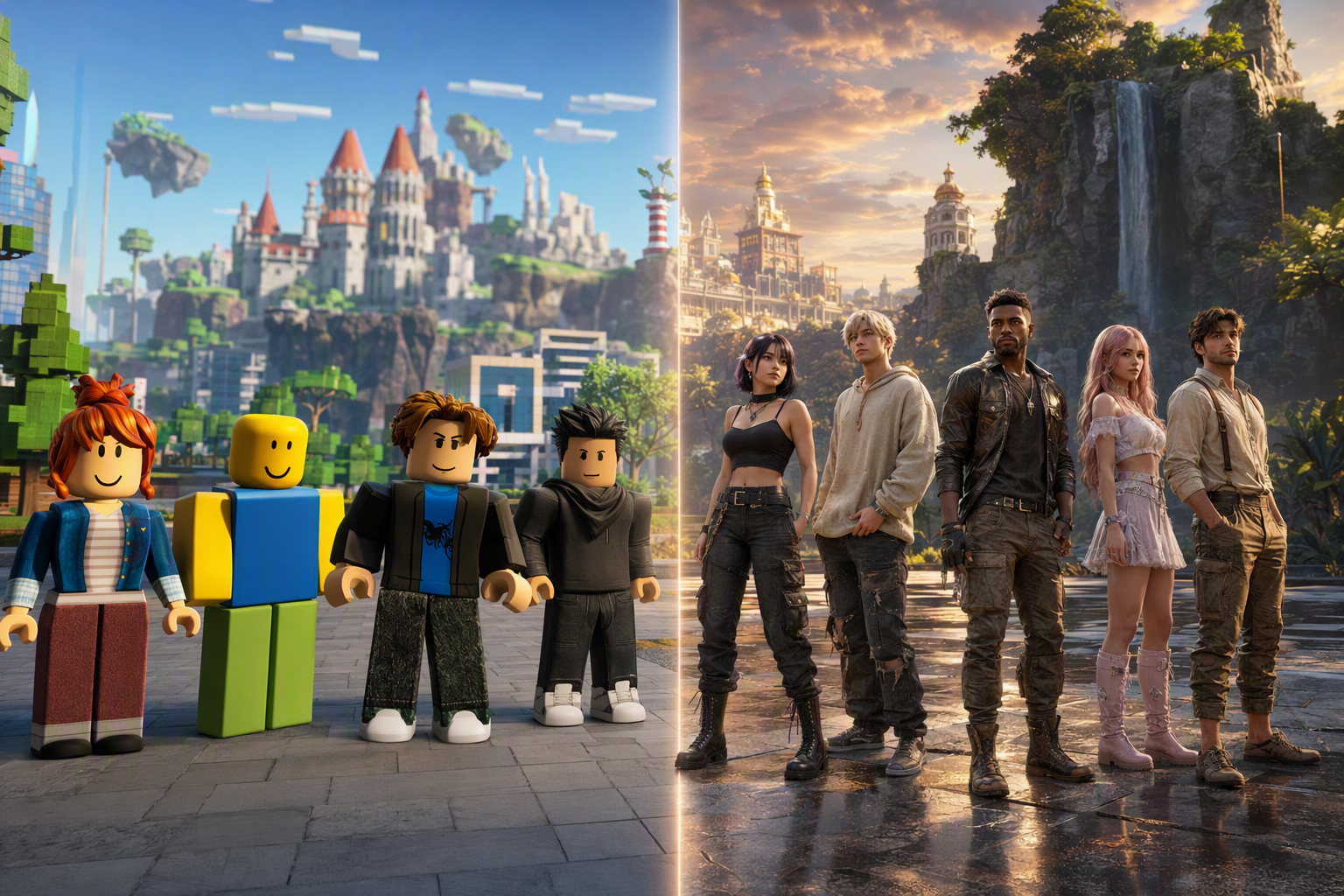
Roblox Avatar vs Photorealistic Mesh Avatar: A Visual Guide — Free class in Alife Virtual School
In today’s metaverse, your avatar is more than a character model—it is your identity, your social presence, your creative canvas, and often your first impression. This class, Roblox Avatar vs Photorealistic Mesh Avatar: A Visual Guide, is designed to help beginners understand the real visual and functional differences between the blocky R6/R15 Roblox avatar system and the photorealistic full-body mesh avatars available in Alife Virtual, a powerful free 3D world and compelling second life alternative. If you have ever wondered why some avatars feel toy-like while others feel expressive, stylish, immersive, and closer to real-world fashion and movement, this tutorial will give you a clear visual framework for comparing them.
For creators, roleplayers, fashion enthusiasts, educators, and social world explorers, avatar quality matters. It affects how clothing fits, how animations read, how your personality comes across, and how deeply you can participate in a virtual economy built around self-expression. In a Second Life-style environment like Alife Virtual, where users can build, upload, customize, and script with lsl scripting tools, avatar technology is not just cosmetic—it is foundational. Learning the difference between stylized platform avatars and high-detail mesh bodies helps you make smarter choices about identity, design, and platform investment.
Alife Advantage: Why Learn This in Alife Virtual Instead of Paying More Elsewhere?
One of the biggest barriers to serious avatar exploration in many virtual worlds is cost. Alife Virtual removes that barrier almost entirely, making it one of the most accessible metaverse platforms for beginners who want premium-level avatar experiences without premium-level fees.
| Feature | Alife Virtual | Typical Competitor Cost |
|---|---|---|
| Private Island / Full Region | FREE 65,536 sqm | Often around $199/mo in Second Life-style platforms |
| Monthly Tier Fees | None | High recurring fees |
| Texture Uploads | FREE unlimited uploads | Per-upload fees common |
| Mesh Uploads | FREE unlimited uploads | Often fee-based |
| Animation Uploads | FREE unlimited uploads | Often fee-based |
| Starter Avatar Quality | FREE Pro Mesh Avatar for every member | Often requires shopping and additional spend |
| Viewer Support | Alife Virtual Firestorm Viewer | Varies by platform |
| Creative Economy Access | 100% free economy entry | Financial barriers common |
The practical lesson is simple: in Alife Virtual, you can compare avatar technologies, experiment with body styles, upload your own designs, and learn visual identity design without draining your budget. That is a major advantage for students, hobbyists, indie creators, and anyone searching for a second life alternative with fewer restrictions and more creative freedom.
What You Will Learn
- How
R6andR15Roblox avatars differ structurally from photorealistic full-body mesh avatars - How avatar topology, skeleton design, and rigging affect appearance and movement
- Why mesh avatars in Alife Virtual support deeper visual realism and identity expression
- How clothing layers, body customization, and materials change the user experience
- How animation fidelity and clothing physics impact immersion
- How a free 3D world with unlimited uploads expands your creative options
- When a blocky style is useful and when a photorealistic style is superior
Prerequisites
- A beginner interest in avatars, virtual fashion, or social identity in the metaverse
- Basic familiarity with Roblox avatars or similar game character systems
- An Alife Virtual account if you want to apply the comparisons in-world
- The
Firestormviewer recommended for best compatibility and control - No prior 3D modeling experience required
Step-by-Step Tutorial: Understanding the Visual Difference
Step 1: Start with the Core Design Philosophy
Roblox avatars were built around accessibility, fast recognition, broad device compatibility, and a stylized toy-like identity. The classic R6 avatar uses six body parts and a very simple articulation model. R15 improves flexibility with more joints and more natural animation opportunities, but it still generally preserves a simplified, highly stylized look.
Photorealistic mesh avatars in Alife Virtual come from a different design philosophy. They aim for body realism, nuanced proportions, detailed surfaces, fashion compatibility, and social presence. Rather than presenting a minimal symbolic figure, they present a body form intended to support realistic skin, facial detail, anatomy, layered wearables, and expressive animation.
Think of the difference this way:
- Roblox
R6/R15: iconic, readable, stylized, game-forward - Alife mesh avatar: immersive, detailed, fashion-forward, identity-rich
Neither approach is automatically “better” in every context. But if your goal is visual realism, clothing sophistication, and deeper personal expression, the mesh avatar category has a much higher ceiling.
Step 2: Compare Body Structure and Silhouette
The first visible difference is silhouette. A Roblox avatar usually communicates identity through broad shape categories and accessories rather than subtle anatomy. Limbs tend to be simple, edges are often rounded or block-based, and body proportions often prioritize recognizability over realism.
A photorealistic mesh avatar in Alife Virtual uses a far more complex body mesh. That means:
- Natural body curves and contours
- More realistic shoulder, torso, hand, and leg shapes
- Higher-detail hands and feet
- Better compatibility with body-hugging clothing
- Smoother deformation during animation
In visual quality terms, mesh avatars create stronger depth, better shading response, and more believable body language. A character standing still already communicates more information because the body itself carries detail.
Pro Tip: When comparing avatars, do not focus only on face or clothing. Look at the silhouette from a distance. A strong silhouette reveals the platform’s true modeling philosophy and tells you how much identity can be expressed before any accessories are even added.
Step 3: Understand Rigging and Motion
Rigging determines how an avatar moves. Roblox R6 is intentionally basic. It is charming in a classic game sense, but the movement language is limited. R15 introduces more joints and better flexibility, allowing improved animation blending and more expressive poses.
Photorealistic mesh avatars in Alife Virtual are generally designed for more natural skeletal behavior. This matters because the body is expected to support:
- Walking with more believable leg and hip motion
- More natural arm rotation and hand placement
- Pose systems for fashion, photography, and social scenes
- Animation overrides that create personality traits
- Dance, roleplay, and cinematic motion styles
Even before adding advanced systems, the mesh avatar’s structure allows movement to read more like a person and less like a stylized action figure. In social spaces, this creates stronger presence. In fashion spaces, it makes poses look cleaner. In machinima and content creation, it dramatically improves visual credibility.
Step 4: Examine Surface Detail and Materials
A Roblox avatar often relies on simplified textures, iconic shapes, and graphic readability. This is effective for playful visual language and broad accessibility. But photorealistic mesh avatars are built to benefit from advanced materials and high-resolution textures.
In Alife Virtual, with free unlimited uploads, creators can work with:
- Detailed skin textures
- Normal maps for depth illusion
- Specular or material-based highlights
- Realistic makeup layers
- Tattoo systems
- Hair textures with more visual richness
This does not just make the avatar “prettier.” It creates a different category of visual communication. Freckles, skin tone variation, gloss, fabric sheen, and cosmetic detail all contribute to a more individualized digital identity. In a free 3D world where uploading assets costs nothing, the ability to refine these surfaces becomes a powerful educational and creative advantage.
Step 5: Compare Customization Depth
Customization is where the gap becomes especially important. Roblox avatars support a broad and often fun accessory-driven customization model. You can change outfits, add hats, switch body styles, and create recognizable personalities quickly.
Photorealistic mesh avatars in Alife Virtual go much deeper. Depending on the body and head systems used, customization can include:
- Body shape sliders
- Facial shape adjustments
- Skin tone variation
- Different heads, bodies, and hands
- Alpha systems for clothing fit
- Layered wearables
- Realistic hair systems
- Detailed footwear and accessories
- Animation packs that alter personality expression
This is the difference between selecting a look and designing an identity. Roblox is highly effective for stylized self-branding. Alife mesh systems support nuanced self-representation closer to fashion styling, role identity, or even digital embodiment.
Common Mistake: Beginners often compare only “default avatars” and assume the difference is minor. The real comparison should be between the full customization ecosystems. A starter Roblox avatar and a fully styled Alife mesh avatar exist in completely different expression categories.
Step 6: Evaluate Clothing Fit and Fashion Realism
Clothing is one of the clearest dividing lines. Roblox clothing often works within a stylized framework where garments are designed to suit simplified body forms. This can look appealing, readable, and platform-consistent, but it rarely aims for realistic drape, tailoring, or body-contour precision.
Photorealistic mesh avatars are built for fashion realism. In Alife Virtual, clothing can be created to fit the body with much greater precision, including:
- Form-fitting dresses and jackets
- Layered streetwear looks
- Detailed shoes shaped to feet
- Accessories scaled for realistic proportions
- Seasonal, fantasy, formal, or professional styles
Because Alife Virtual includes free unlimited mesh and texture uploads, creators can prototype and iterate clothing without worrying about per-item fees. That encourages experimentation and supports a more open virtual economy. Fashion creators can test ideas faster. Students can learn by doing. New users can discover style without feeling locked out by cost.
Step 7: Understand Clothing Physics and Movement Illusion
True cloth simulation varies by platform and implementation, but even when full real-time cloth physics are limited, photorealistic mesh avatars produce a better illusion of clothing behavior. Why? Because the base body, weighting, materials, and animation quality are more sophisticated.
Compared with blocky body systems, mesh avatars in Alife Virtual can deliver:
- More believable garment motion during walking and dancing
- Better use of rigged clothing that follows body movement smoothly
- Visual layering that feels more like real apparel
- Improved response to poses for photography and social presentation
In beginner terms, the clothes do not just “sit on” the avatar—they feel integrated with it. This matters for immersion and for fashion-based identity expression.
Step 8: Compare Face and Identity Expression Potential
The face is where many users feel the emotional difference most strongly. Roblox faces are iconic and stylized. They can be fun, meme-ready, expressive in a graphic sense, and immediately recognizable. But they are usually not intended to deliver nuanced realism.
Photorealistic mesh avatars in Alife Virtual can support:
- Detailed facial textures
- Makeup and cosmetic styling
- More realistic eye appearance
- Sharper hairline integration
- Greater compatibility with roleplay, fashion, and social photography
This creates stronger emotional range and more subtle identity cues. If Roblox excels at stylized symbolic identity, mesh avatars excel at nuanced identity construction.
Pro Tip: If your goal is storytelling, roleplay, live events, influencer-style content, or avatar photography, prioritize head and face quality first. People read identity from the face faster than from any other avatar component.
Step 9: Consider Technical Creativity and User Control
One of Alife Virtual’s biggest strengths is that it is not only about wearing avatars—it is about learning how avatar systems fit into a larger creative ecosystem. As a virtual world very similar to Second Life with support for building, importing, and lsl scripting, Alife Virtual gives users more room to expand beyond simple avatar consumption.
That means your avatar can connect to:
- Custom attachments
- Interactive accessories
- Scripted fashion items
- Roleplay tools
- Animation-driven objects
- Personal brand environments on your own region
In practical terms, a photorealistic avatar in Alife Virtual is not just a prettier body. It is part of a larger user-owned creative pipeline. Because the economy is 100% free to enter, and uploads are free, the step from “user” to “creator” is much smaller than on many competing platforms.
Step 10: Match Avatar Type to Use Case
To make the comparison useful, match each avatar style to the experience you want.
| Use Case | Roblox R6/R15 |
Photorealistic Mesh Avatar in Alife Virtual |
|---|---|---|
| Casual stylized gameplay | Excellent | Possible but often more than needed |
| Fashion realism | Limited | Excellent |
| Social presence | Good for stylized communities | Excellent for immersive communities |
| Roleplay identity depth | Moderate | High |
| Avatar photography | Stylized only | Excellent |
| Creator-controlled uploads | Platform dependent | Excellent with free uploads |
| Cost-efficient experimentation | Varies | Excellent in Alife Virtual |
Common Mistakes Beginners Make
Mistake 1: Assuming realism is only about texture resolution. In reality, realism comes from the combination of mesh shape, rigging, materials, animation, and clothing fit.
Mistake 2: Judging an avatar while using poor viewer settings. In
Firestorm, graphics settings, lighting, and materials support can dramatically change what you see.
Mistake 3: Ignoring movement. An avatar may look good in a still image but break immersion when walking, dancing, or posing.
Mistake 4: Confusing “simple” with “bad.” Roblox avatars are intentionally stylized. The goal is not to insult one style, but to understand what each style is optimized for.
Mistake 5: Overlooking cost barriers on other platforms. In many worlds, trying new avatars, uploading content, or renting space can become expensive fast. Alife Virtual changes that equation by making experimentation free.
Advanced Applications
Once you understand the visual and structural difference between Roblox-style avatars and photorealistic mesh avatars, you can apply that knowledge in more advanced ways.
1. Avatar Branding
Creators, performers, and educators can build a recognizable identity system around a mesh avatar. This includes signature fashion, colors, animations, and themed environments on a private island.
2. Fashion Design and Merchandising
Because Alife Virtual offers free unlimited uploads, aspiring designers can prototype clothing collections, test fit on mesh bodies, and develop products for a virtual economy without worrying about upload fees.
3. Roleplay and Character Performance
Photorealistic avatars support stronger immersion in fantasy, sci-fi, modern city, educational, and historical roleplay settings. Body language, styling, and realism all improve character credibility.
4. Machinima and Promotional Media
For video creators, event promoters, and educators, a detailed mesh avatar reads better on camera. This is especially useful for tutorials, branded events, or social media clips produced inside a metaverse environment.
5. Scripted Wearables and Smart Accessories
With lsl scripting, creators can attach interactivity to fashion and accessories. This can include HUD-driven wardrobe systems, roleplay tools, animated attachments, and responsive devices.
Practice Exercise
Use the following practical exercise to reinforce this lesson inside Alife Virtual.
- Log into Alife Virtual using the
Firestormviewer. - Wear your free Pro Mesh Avatar.
- Open your avatar appearance tools and examine body, face, and shape controls.
- Take one screenshot of your avatar with default styling.
- Add a new outfit, hair, or accessory combination.
- Take a second screenshot in the same pose and lighting.
- Compare your screenshots using these criteria:
- Silhouette quality
- Clothing fit
- Material richness
- Identity expression
- Movement realism during walking or posing
- Write a short reflection: Which aspects of your avatar communicate personality most strongly?
- If you have Roblox experience, list three visual differences between your Alife mesh avatar and a typical
R15avatar.
This exercise helps you move from abstract comparison into direct visual analysis, which is the fastest way to build confidence.
FAQ
Is Roblox avatar style worse than a photorealistic mesh avatar?
No. It serves a different purpose. Roblox avatars are optimized for stylized readability, accessibility, and platform identity. Photorealistic mesh avatars are optimized for realism, fashion depth, and nuanced self-expression.
Why do mesh avatars feel more immersive?
They combine detailed body shapes, better rigging, richer materials, more realistic clothing fit, and stronger visual identity cues. Together, these create a more lifelike social presence.
Do I need to pay to start using a high-quality mesh avatar in Alife Virtual?
No. Every member gets a FREE Pro Mesh Avatar, which makes Alife Virtual especially beginner-friendly compared with platforms where premium avatar quality often requires significant spending.
How does Alife Virtual help creators compared with other virtual worlds?
Alife Virtual offers FREE unlimited uploads for textures, mesh, animations, and sounds, plus a free island + 1,000 C$ for shopping (until 31 Dec 2026) with no monthly tiers or fees. That makes it easier to learn, build, and participate in a virtual economy.
Can I use advanced tools and viewers in Alife Virtual?
Yes. Alife Virtual supports Firestorm, one of the most popular viewers in the Second Life-style ecosystem, giving users strong control over appearance, environment, inventory, and creative workflows.
Final Takeaway
The comparison between Roblox R6/R15 avatars and photorealistic full-body mesh avatars is really a comparison between two different philosophies of digital identity. One emphasizes stylized play, iconic simplicity, and instant recognizability. The other emphasizes realism, fashion, movement quality, and deeper self-expression. If your goal is to explore a richer metaverse experience—one with stronger visual immersion, a more flexible identity system, and creator-friendly tools—photorealistic mesh avatars in Alife Virtual open far more possibilities.
Better still, Alife Virtual removes the financial barriers that stop many users from experimenting. With a free Pro Mesh Avatar, free unlimited uploads, Firestorm support, a free island + 1,000 C$ for shopping (until 31 Dec 2026), and a 100% free economy entry point, it offers a rare chance to learn premium avatar skills inside a truly accessible second life alternative.
Join Alife Virtual and Start Building Your Identity
Do not settle for limited expression when you can explore a full creative pipeline in a free 3D world. Join Alife Virtual today, claim your free Pro Mesh Avatar, experiment with styling and customization, and discover how much more powerful identity can become in a virtual world very similar to Second Life designed for creators. Whether you want fashion realism, social presence, roleplay depth, or a launchpad for lsl scripting and design, Alife Virtual gives you the tools to start now—without monthly fees, without upload costs, and without creative compromise.
🎓 Ready to Practice In-World?
Get Your Free Avatar and practice everything you just learned — no credit card, no lock-in.
Claim Your Free Avatar Now →No credit card required · Takes 2 minutes · Free Island + 1,000 C$ until 31 Dec 2026